データバックアップ用にポータブル2.0TBytes HDDを購入した。
この1年ほど、メモリー産業が単価の高いAI用HBM(広帯域メモリー)を増産するために、従来型のDRAMの生産量を減らした。この影響で、ハードディスク価格まで暴騰している。
HBMメモリー増産
DRAMメモリー減産 → 需給バランス崩れて価格上昇
NAND SSDの需要増 → 需給バランス崩れて価格上昇
HDDの需要増 → 需給バランス崩れて価格上昇
すごい将棋倒し状態だ。
今後、循環投資状態のAIバブルが崩壊したら一気にすべての価格が下落するはずだが、私の資産も暴落するため困ったことになる。
ハードディスクの価格調査と購入対象の選択
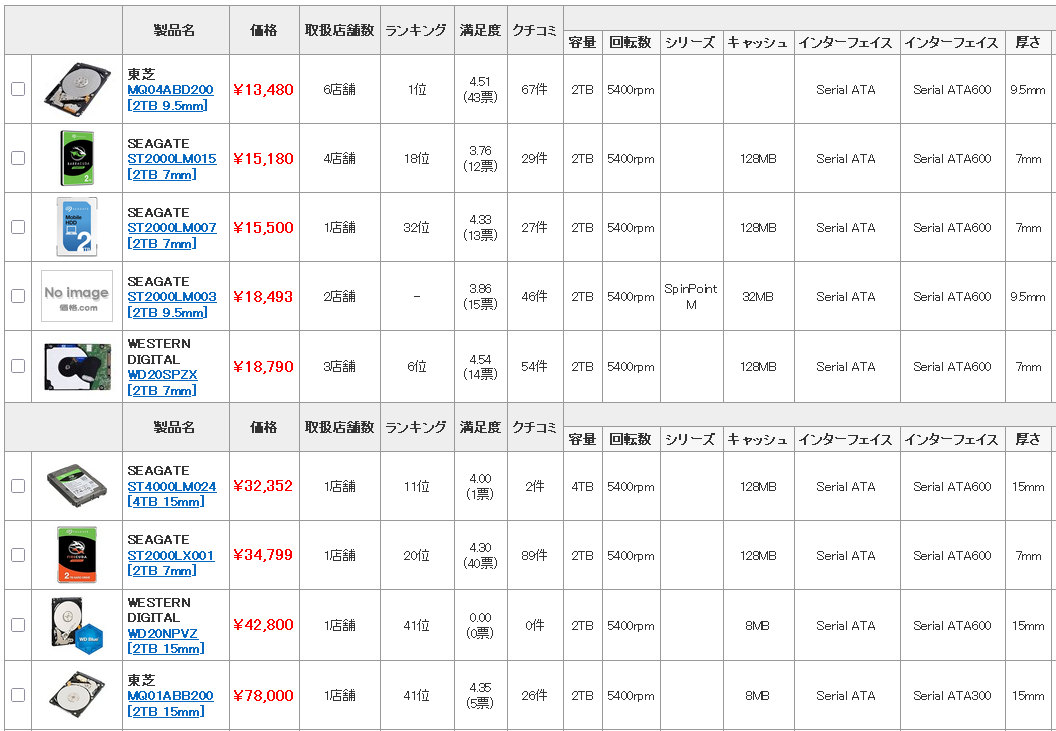
2.0TBytes 2.5inch HDDの価格一覧
最安値が東芝製MQ04ABD200で13,480円。USB変換ケースが500円〜1,000円の別売りなので、ポータブルHDDとしては14,000円程度と考えてよい。
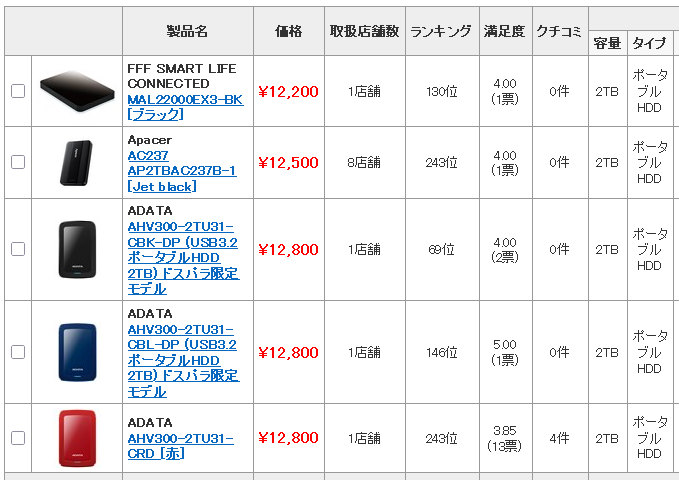
2.0TBytes ポータブルHDDの価格一覧
著名なメーカー製の最安値はADATA製AHV300-2TU31で12,800円となっている。
ベアドライブよりも(USBケース込みの)ポータブルドライブのほうが安いのは、メーカーがドライブを仕入れた時期の価格を反映しているからだろう。
今回は、最も安価となったADATA製AHV300-2TU31を購入することとする。
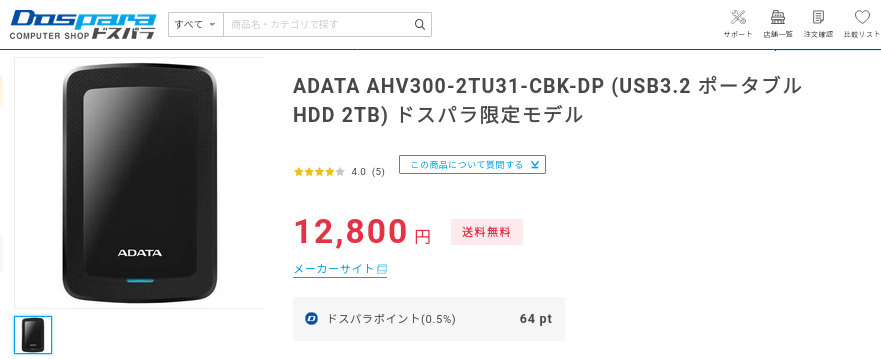
ドスパラで売られているAHV300-2TU31
自宅の近所、大阪なんばのドスパラに買いに行くことにした。
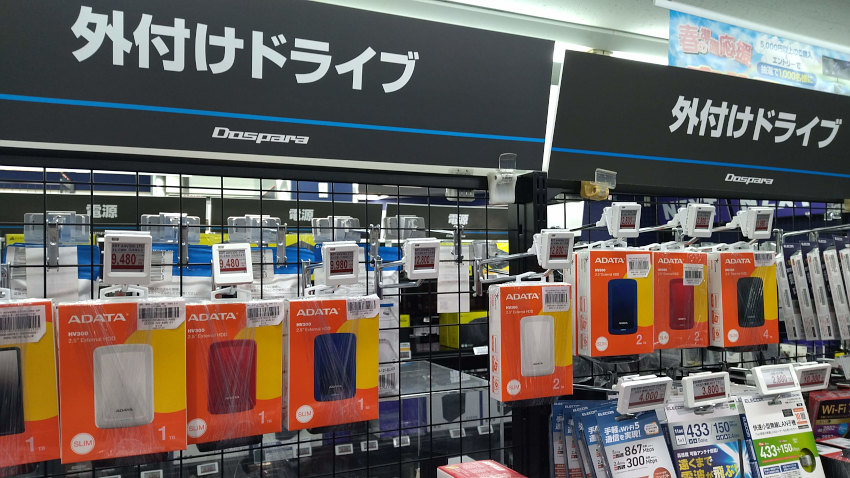
ドスパラ 大阪なんば店で売られているADATA AHV300
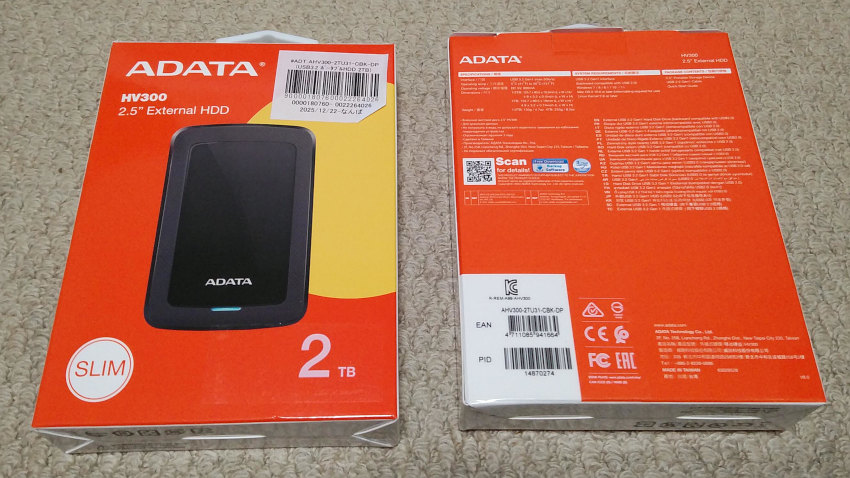
ADATA HV300のパッケージ (2つ購入した)
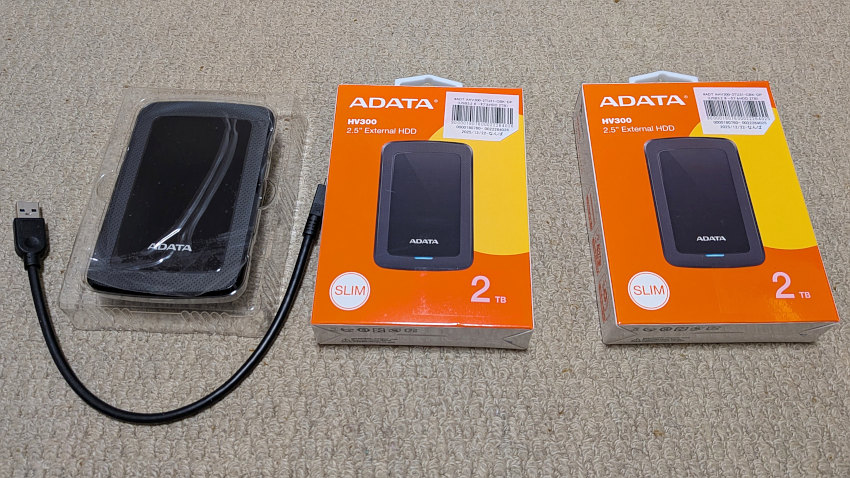
ADATA HV300のパッケージ同梱物(本体とUSB3.2 Gen 1ケーブル)
パッケージの裏面に、バックアップソフトウエアなどがダウンロードできるサポートサイトのQRコードが印刷されているが、これをクリックすると
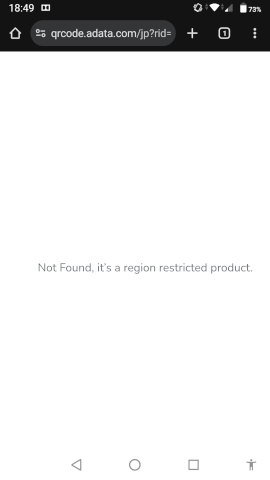
ADATA HV300は日本向け製品ではない(region restricted product)
おそらく、このURLがちゃんと機能する地域(ブラウザの言語設定?)であれば、「Backup ToGo」のダウンロードページが表示されるのだと思われる。オンライン版のマニュアルを参照すると、Windows版ソフトウエアの表示言語は英語と中国語しか選択できず、たしかに日本人は相手にしていないのだとわかる。
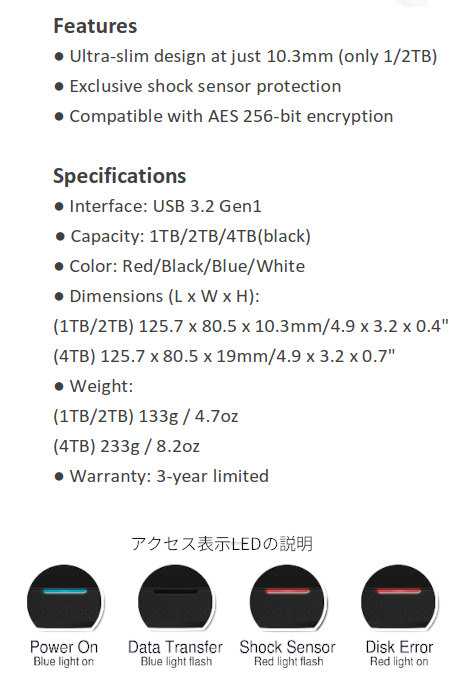
ADATA HV300の仕様(Webページの情報より切り貼り)
ドライブの素性を調査する
USB HDDケースの素性を調査
$ lsusb
Bus 002 Device 003: ID 125f:a82a A-DATA Technology Co., Ltd. HV300
Bus 002 Device 002: ID 05e3:0625 Genesys Logic, Inc. USB3.2 Hub
Bus 002 Device 001: ID 1d6b:0003 Linux Foundation 3.0 root hub
Bus 001 Device 003: ID 05e3:0610 Genesys Logic, Inc. Hub
Bus 001 Device 002: ID 046d:c534 Logitech, Inc. Unifying Receiver
Bus 001 Device 004: ID 8087:0a2a Intel Corp. Bluetooth wireless interface
Bus 001 Device 001: ID 1d6b:0002 Linux Foundation 2.0 root hub

$ lsusb -t
/:  Bus 02.Port 1: Dev 1, Class=root_hub, Driver=xhci_hcd/6p, 10000M
    |__ Port 6: Dev 2, If 0, Class=Hub, Driver=hub/4p, 5000M
        |__ Port 1: Dev 3, If 0, Class=Mass Storage, Driver=usb-storage, 5000M
/:  Bus 01.Port 1: Dev 1, Class=root_hub, Driver=xhci_hcd/16p, 480M
    |__ Port 7: Dev 2, If 0, Class=Human Interface Device, Driver=usbhid, 12M
    |__ Port 7: Dev 2, If 1, Class=Human Interface Device, Driver=usbhid, 12M
    |__ Port 8: Dev 3, If 0, Class=Hub, Driver=hub/4p, 480M
    |__ Port 14: Dev 4, If 0, Class=Wireless, Driver=btusb, 12M
    |__ Port 14: Dev 4, If 1, Class=Wireless, Driver=btusb, 12M
NTFSディスクを扱っているドライバの判別(ntfs-3gかntfs3かの判別)
$ mount | grep -e /dev/sdb
/dev/sdb2 on /media/vm/ADATA HV300 type ntfs3 (rw,nosuid,nodev,relatime,uid=1001,gid=1001,windows_names,iocharset=utf8,uhelper=udisks2)
初期状態での論理フォーマット状況
$ sudo lsblk /dev/sdb
NAME   MAJ:MIN RM  SIZE RO TYPE MOUNTPOINTS
sdb      8:16   0  1.8T  0 disk
├─sdb1   8:17   0   16M  0 part
└─sdb2   8:18   0  1.8T  0 part /media/vm/ADATA HV300


$ sudo fdisk -l /dev/sdb
ディスク /dev/sdb: 1.82 TiB, 2000398934016 バイト, 3907029168 セクタ
Disk model: HV300
単位: セクタ (1 * 512 = 512 バイト)
セクタサイズ (論理 / 物理): 512 バイト / 512 バイト
I/O サイズ (最小 / 推奨): 512 バイト / 512 バイト
ディスクラベルのタイプ: gpt
ディスク識別子: 487C7E68-B996-4BD0-82CC-C52557C8A2C5

デバイス   開始位置   最後から     セクタ サイズ タイプ
/dev/sdb1        34      32767      32734    16M Microsoft 予約領域
/dev/sdb2     32768 3907028991 3906996224   1.8T Microsoft 基本データ
SMARTの基本データ
$ sudo smartctl -d sat -i /dev/sdb
smartctl 7.2 2020-12-30 r5155 [x86_64-linux-6.8.0-90-generic] (local build)
Copyright (C) 2002-20, Bruce Allen, Christian Franke, www.smartmontools.org

=== START OF INFORMATION SECTION ===
Model Family:     Seagate Mobile HDD
Device Model:     ST2000LM007-1R8174
Serial Number:    WY26NS85
LU WWN Device Id: 5 000c50 0fb97394f
Firmware Version: EB01
User Capacity:    2,000,398,934,016 bytes [2.00 TB]
Sector Sizes:     512 bytes logical, 4096 bytes physical
Rotation Rate:    5400 rpm
Form Factor:      2.5 inches
Device is:        In smartctl database [for details use: -P show]
ATA Version is:   ACS-3 T13/2161-D revision 3b
SATA Version is:  SATA 3.1, 6.0 Gb/s (current: 6.0 Gb/s)
Local Time is:    Thu Feb 12 22:02:34 2026 JST
SMART support is: Available - device has SMART capability.
SMART support is: Enabled
SMARTの全データ
$ sudo smartctl -d sat -a /dev/sdb
smartctl 7.2 2020-12-30 r5155 [x86_64-linux-6.8.0-90-generic] (local build)
Copyright (C) 2002-20, Bruce Allen, Christian Franke, www.smartmontools.org

=== START OF INFORMATION SECTION ===
Model Family:     Seagate Mobile HDD
Device Model:     ST2000LM007-1R8174
Serial Number:    WY26NS85
LU WWN Device Id: 5 000c50 0fb97394f
Firmware Version: EB01
User Capacity:    2,000,398,934,016 bytes [2.00 TB]
Sector Sizes:     512 bytes logical, 4096 bytes physical
Rotation Rate:    5400 rpm
Form Factor:      2.5 inches
Device is:        In smartctl database [for details use: -P show]
ATA Version is:   ACS-3 T13/2161-D revision 3b
SATA Version is:  SATA 3.1, 6.0 Gb/s (current: 6.0 Gb/s)
Local Time is:    Thu Feb 12 22:03:24 2026 JST
SMART support is: Available - device has SMART capability.
SMART support is: Enabled

=== START OF READ SMART DATA SECTION ===
SMART Status not supported: Incomplete response, ATA output registers missing
SMART overall-health self-assessment test result: PASSED
Warning: This result is based on an Attribute check.

General SMART Values:
Offline data collection status:  (0x00)	Offline data collection activity
					was never started.
					Auto Offline Data Collection: Disabled.
Self-test execution status:      (   0)	The previous self-test routine completed
					without error or no self-test has ever
					been run.
Total time to complete Offline
data collection: 		(    0) seconds.
Offline data collection
capabilities: 			 (0x71) SMART execute Offline immediate.
					No Auto Offline data collection support.
					Suspend Offline collection upon new
					command.
					No Offline surface scan supported.
					Self-test supported.
					Conveyance Self-test supported.
					Selective Self-test supported.
SMART capabilities:            (0x0003)	Saves SMART data before entering
					power-saving mode.
					Supports SMART auto save timer.
Error logging capability:        (0x01)	Error logging supported.
					General Purpose Logging supported.
Short self-test routine
recommended polling time: 	 (   1) minutes.
Extended self-test routine
recommended polling time: 	 ( 331) minutes.
Conveyance self-test routine
recommended polling time: 	 (   2) minutes.
SCT capabilities: 	       (0x3035)	SCT Status supported.
					SCT Feature Control supported.
					SCT Data Table supported.

SMART Attributes Data Structure revision number: 10
Vendor Specific SMART Attributes with Thresholds:
ID# ATTRIBUTE_NAME          FLAG     VALUE WORST THRESH TYPE      UPDATED  WHEN_FAILED RAW_VALUE
  1 Raw_Read_Error_Rate     0x000f   100   100   006    Pre-fail  Always       -       377353
  3 Spin_Up_Time            0x0003   100   100   000    Pre-fail  Always       -       0
  4 Start_Stop_Count        0x0032   100   100   020    Old_age   Always       -       4
  5 Reallocated_Sector_Ct   0x0033   100   100   036    Pre-fail  Always       -       0
  7 Seek_Error_Rate         0x000f   100   253   045    Pre-fail  Always       -       361
  9 Power_On_Hours          0x0032   100   100   000    Old_age   Always       -       0 (138 234 0)
 10 Spin_Retry_Count        0x0013   100   100   097    Pre-fail  Always       -       0
 12 Power_Cycle_Count       0x0032   100   100   020    Old_age   Always       -       3
184 End-to-End_Error        0x0032   100   100   099    Old_age   Always       -       0
187 Reported_Uncorrect      0x0032   100   100   000    Old_age   Always       -       0
188 Command_Timeout         0x0032   100   253   000    Old_age   Always       -       0
189 High_Fly_Writes         0x003a   100   100   000    Old_age   Always       -       0
190 Airflow_Temperature_Cel 0x0022   080   079   040    Old_age   Always       -       20 (Min/Max 17/20)
191 G-Sense_Error_Rate      0x0032   100   100   000    Old_age   Always       -       0
192 Power-Off_Retract_Count 0x0032   100   100   000    Old_age   Always       -       2
193 Load_Cycle_Count        0x0032   100   100   000    Old_age   Always       -       6
194 Temperature_Celsius     0x0022   020   040   000    Old_age   Always       -       20 (0 17 0 0 0)
197 Current_Pending_Sector  0x0012   100   100   000    Old_age   Always       -       0
198 Offline_Uncorrectable   0x0010   100   100   000    Old_age   Offline      -       0
199 UDMA_CRC_Error_Count    0x003e   200   200   000    Old_age   Always       -       0
240 Head_Flying_Hours       0x0000   100   253   000    Old_age   Offline      -       0 (106 186 0)
241 Total_LBAs_Written      0x0000   100   253   000    Old_age   Offline      -       131304
242 Total_LBAs_Read         0x0000   100   253   000    Old_age   Offline      -       246049
254 Free_Fall_Sensor        0x0032   100   100   000    Old_age   Always       -       0

SMART Error Log Version: 1
No Errors Logged

SMART Self-test log structure revision number 1
No self-tests have been logged.  [To run self-tests, use: smartctl -t]

SMART Selective self-test log data structure revision number 1
 SPAN  MIN_LBA  MAX_LBA  CURRENT_TEST_STATUS
    1        0        0  Not_testing
    2        0        0  Not_testing
    3        0        0  Not_testing
    4        0        0  Not_testing
    5        0        0  Not_testing
Selective self-test flags (0x0):
  After scanning selected spans, do NOT read-scan remainder of disk.
If Selective self-test is pending on power-up, resume after 0 minute delay.
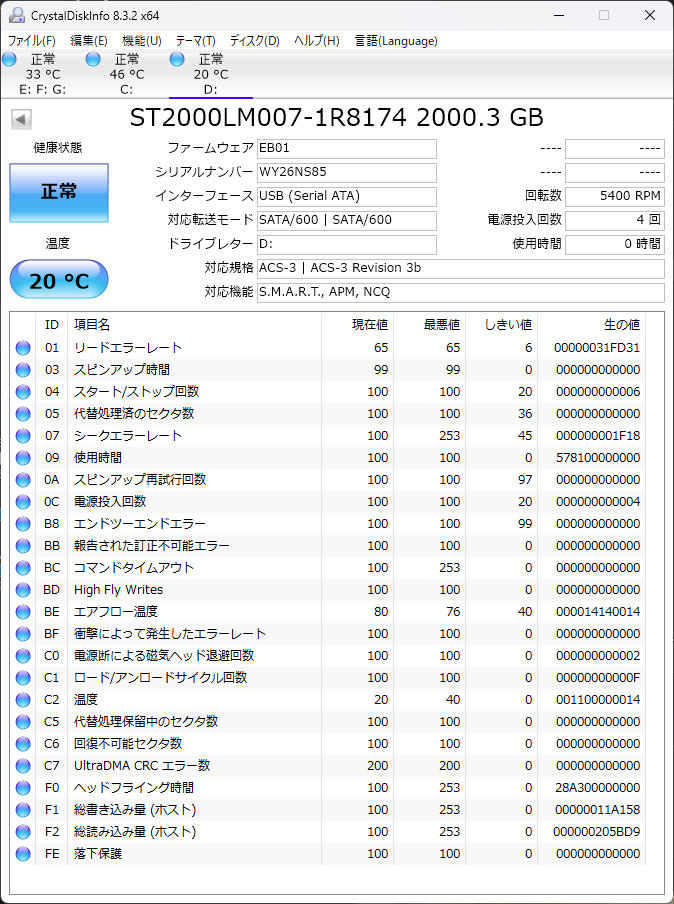
Windows版CrystalDiskInfo
最低限のテストを行う
SMARTのテスト
$ sudo smartctl -d sat -t short /dev/sdb
smartctl 7.2 2020-12-30 r5155 [x86_64-linux-6.8.0-90-generic] (local build)
Copyright (C) 2002-20, Bruce Allen, Christian Franke, www.smartmontools.org

=== START OF OFFLINE IMMEDIATE AND SELF-TEST SECTION ===
Sending command: "Execute SMART Short self-test routine immediately in off-line mode".
Drive command "Execute SMART Short self-test routine immediately in off-line mode" successful.
Testing has begun.
Please wait 1 minutes for test to complete.
Test will complete after Thu Feb 12 22:23:32 2026 JST
Use smartctl -X to abort test.

$ sudo smartctl -d sat -l selftest /dev/sdb
smartctl 7.2 2020-12-30 r5155 [x86_64-linux-6.8.0-90-generic] (local build)
Copyright (C) 2002-20, Bruce Allen, Christian Franke, www.smartmontools.org

=== START OF READ SMART DATA SECTION ===
SMART Self-test log structure revision number 1
Num  Test_Description    Status                  Remaining  LifeTime(hours)  LBA_of_first_error
# 1  Short offline       Completed without error       00%         0         -
アクセス速度の測定
$ sudo hdparm -Tt /dev/sdb

/dev/sdb:
 Timing cached reads:   25834 MB in  1.98 seconds = 13036.17 MB/sec
 Timing buffered disk reads: 376 MB in  3.01 seconds = 124.88 MB/sec

$ dd if=/dev/urandom of=/media/vm/ADATA\ HV300/test.dat bs=1G count=1 conv=fdatasync
1+0 レコード入力
1+0 レコード出力
1073741824 bytes (1.1 GB, 1.0 GiB) copied, 12.9811 s, 82.7 MB/s

$ ll system.img
-rw-rw-r-- 1 vm vm 2394947584 2024-10-04 17:45:46 system.img

$ time (cp ./system.img /media/vm/ADATA\ HV300/ && sync)

real	0m20.988s → 2,394,947,584÷1,024÷1,024÷20.99 = 108 MBytes/sec
user	0m0.019s
sys	0m1.464s
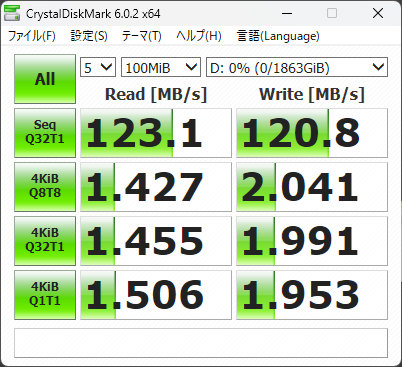
Windows版CrystalDiskMark
Linuxのgnome-disksベンチマークがうまく機能しない(書き込み速度が異常)
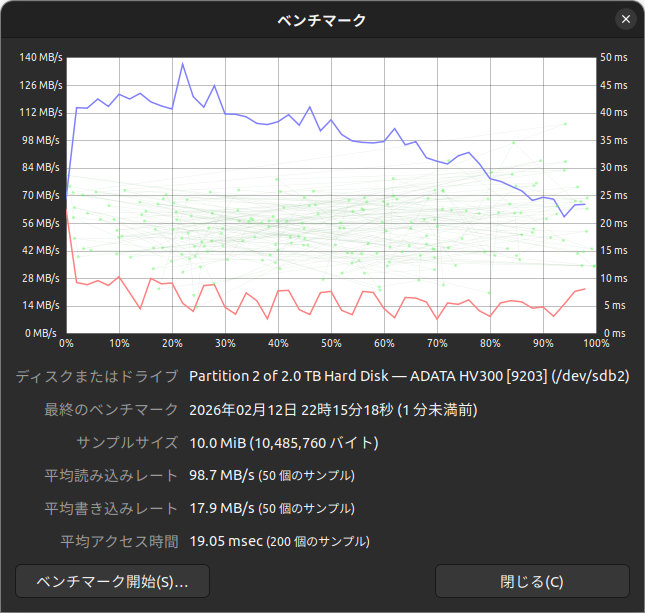
gnome-disksのベンチマーク (書き込み速度が異常)
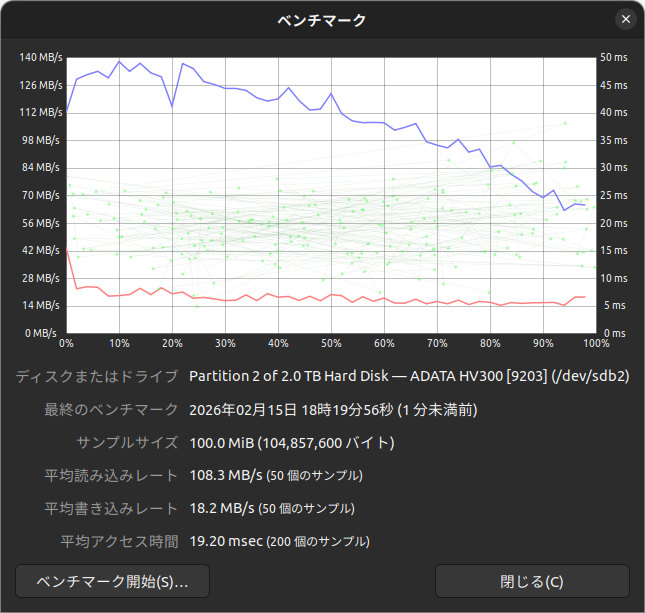
gnome-disksのベンチマーク (書き込みサイズを100MBytesに増やしても、書き込み速度が異常)
試しに、ほかのHDDで試してみると正常である。つまり、Seagate製HDD ST2000LM007またはADATA製AHV300ケースとgnome-disksの「相性問題」が発生しているのだろう。ST2000LM007がSMRディスクであるというが影響しているのかはわからない。
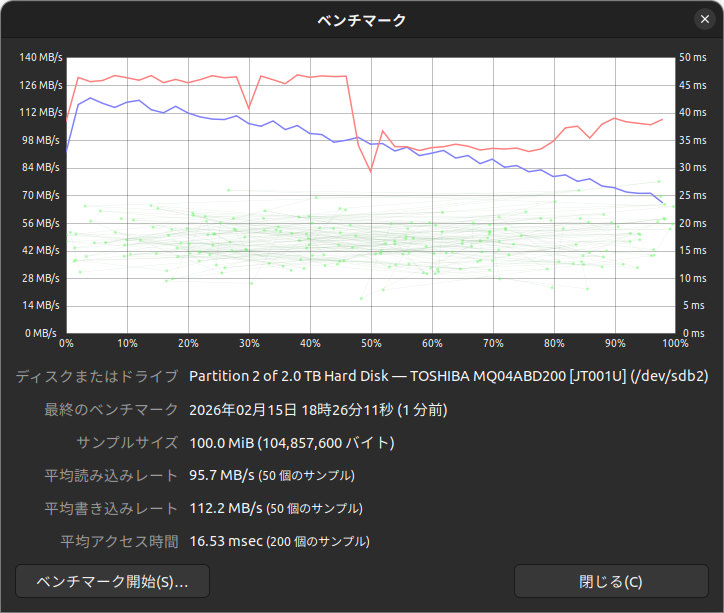
東芝の2.0TBytes HDD MQ04ABD200でのベンチマークは、書き込み速度正常
